
A few weeks ago, I saw a sudden spike in traffic from China and Singapore on my website in Google Analytics. The numbers were huge. At first, I thought maybe a few posts from my website went viral in Google search results. But when I checked the pages getting views, I noticed something unusual. Most of this traffic was landing on 404 pages, random paginated URLs, and fake category pages. Completely nonexistent paths. It was clear that this was not real traffic. They were bots.
I searched on Google and a few tech forums and realised I was not the only one facing this. Many website owners were confused about the same issue. The common pattern was the same: high, constant traffic from China or Singapore, mostly hitting weird URLs and generating thousands of 404s.
So I decided to fix it properly. I tested some Cloudflare rules to challenge specifically China and Singapore bots while allowing the good bots, Wordfence protections, rate limiting rules, and multiple small tweaks on my site until the bot traffic finally stopped.
Once everything started working and the unwanted traffic from China and Singapore calmed down, I thought it would be better to write a clear step-by-step guide so others can fix it easily, too.
This article is simply my own experience of how I stopped China and Singapore bot traffic with just a few settings and rules. No theory. Just the exact steps I used to stop China and Singapore bot traffic completely.
Quick Summary: How I Stopped Bot Traffic from China and Singapore
If you are seeing very high traffic from China and Singapore, first check which pages are getting those visits. In most cases, you’ll find the traffic is landing on random URLs and 404 pages. That’s a clear sign of bot activity.
To stop it, I didn’t rely on one tool. I took a layered approach. I asked my hosting provider to block abusive IPs at server level, tightened Wordfence rate limiting to stop repeated 404 hits, enabled Bot Fight Mode in Cloudflare, and finally added a Cloudflare rule to block non-search-engine traffic from China and Singapore.
These small steps worked together. The fake traffic stopped, the 404 spam disappeared, and real users and search engines were not affected. This article shows exactly how I did it, step by step, using simple settings anyone can apply.
4 Steps To Stop Bot Traffic From China and Singapore Completely
After identifying that the traffic was coming from bots and mostly hitting 404 pages, I followed a simple but structured approach.
Instead of relying on a single setting or plugin, I combined server-level help, WordPress protection, and Cloudflare rules. Each step added one more layer of control.
Together, these 4 steps helped me stop bot traffic from China and Singapore without affecting real visitors or search engine bots.
1. Ask the Hosting Provider to Block Known Abusive IPs
This was the very first thing I did. Before touching Cloudflare or setting up any security plugin on WordPress, I contacted my hosting provider.
Why?
Because hosting companies can see things we can’t. They have server-level logs. They know which IPs are hitting hundreds or thousands of requests in a short time.
Also, some platforms like AbusiveIPDB allow you to check if any particular IP is really abusive and how many times it has been reported as abusive.
I simply told them this:
I’m getting heavy bot traffic from China and Singapore.
Most of it is hitting random URLs and 404 pages.
Can you please check and block abusive IPs or IP ranges from your side?
That’s it. No technical language. No long explanation.
Within a few hours, they replied with a list of IPs that were clearly abusive. Some were sending thousands of requests per hour. Some were scanning random paths again and again.

The hosting team blocked those IPs directly at the server level.
This step is important because:
- Server-level blocking is stronger than plugins.
- These IPs never reach WordPress or Cloudflare rules.
- It instantly reduces load on your site.
Even if you are not very technical, you should always do this step. Most hosting providers are helpful when it comes to abuse and security issues.
Once the hosting provider blocked some abusive IPs from China and Singapore, the bot traffic reduced a bit. Not fully. But enough to move to the next step.
2. Strengthen Wordfence Rate Limiting Rules
After getting the known abusive IPs blocked at server level, the next layer I worked on was Wordfence. If you’re using WordPress, this step is very important.
Bots don’t behave like humans. A normal person clicks one page, reads it, then moves to another. But, bots hit many pages very fast. Sometimes hundreds in just one minute.
If you’re not using the Wordfence plugin, install it on your WordPress website. It has a feature called Rate Limiting. It simply means: “How many times can someone hit my site in a short time?”
You can find this feature by navigating to Wordfence → Firewall → Rate Limiting. To know about the recommended thresholds, you can check this knowledge base.
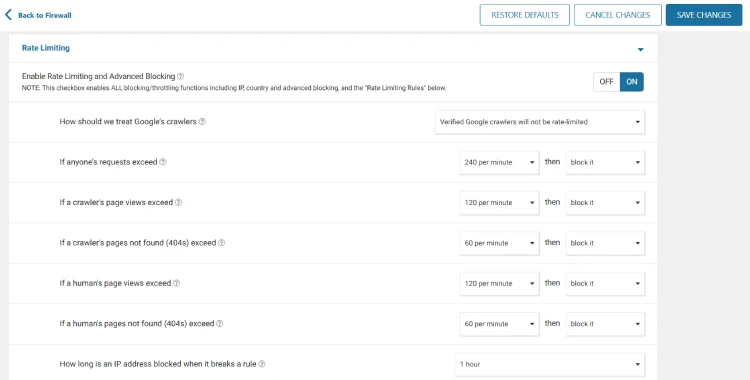
I chose to throttle the requests instead of blocking. For more powerful rate limiting, you can block them instead.
Most of the China and Singapore bot traffic was creating random URLs. That means lots of 404 errors in a short time. So, once you set up rate-limiting rules at Wordfence, those abusive IPs will be blocked automatically.
Think of it like this. If someone keeps asking for rooms that don’t exist in your house, again and again, you know they don’t belong there.
This step helped a lot. Many bots were stopped automatically without me doing anything. And real visitors were not affected at all.
3. Turn on Bot Fight Mode in Cloudflare
After getting help from hosting provider and setting up rate limiting rules in Wordfence, I moved to Cloudflare. This step was simple, but very powerful.
Cloudflare has a feature called Bot Fight Mode. You don’t need to write any rules for it. You just turn it on, and Cloudflare starts fighting with the bots for you.
Bot Fight Mode tries to spot bad bots automatically. It looks at how a visitor behaves, not just where they are from. If something acts like a bot, Cloudflare slows it down or blocks it.
To turn it on, login to your Cloudflare account, under Security → Settings, look for the Bot Fight Mode feature, and then turn the toggle on.
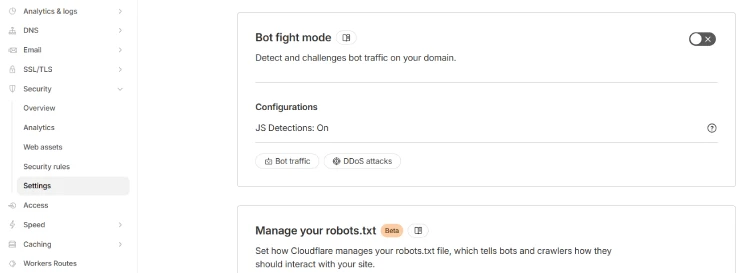
After turning it on, I noticed a big difference. Many useless requests never reached my website at all. Cloudflare stopped them before they could create more 404 pages.
Think of Bot Fight Mode like a smart watchman. You don’t tell him who is bad. He watches how people act and stops the ones doing strange things.
This step alone won’t stop everything. But it adds a strong layer of protection.
Once Bot Fight Mode was active, the bot traffic reduced further. But, still, sometimes I could see some bots visiting from China and Singapore. This was the time I decided to apply custom rules to handle the remaining bots more strictly.
4. Cloudflare Custom Rule
By this point, the bot traffic was already much lower, but if, in your case, it’s still very high, you can try using this custom rule at Cloudflare.
Before setting up this rule, you need to ask yourself one simple question. “Do I really need normal visitors from these two countries right now?”
For my website, the answer was no.
If your website doesn’t need visitors from China and Singapore, you should try applying this rule.
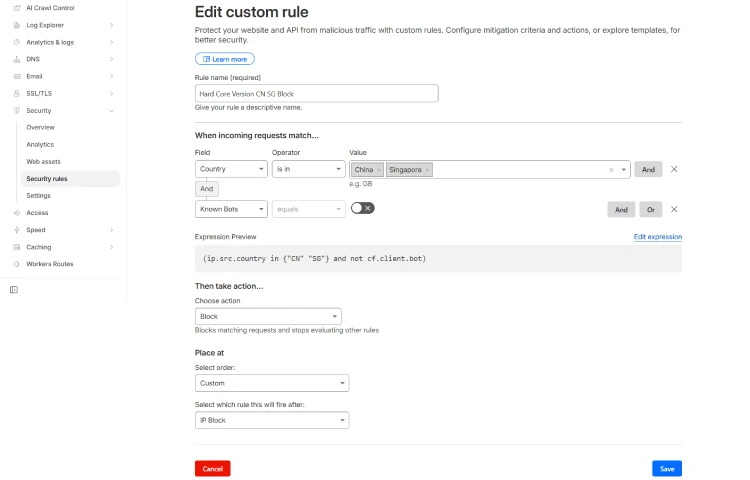
This rule does only one thing. It checks where the visitor is coming from. If the visitor is from China or Singapore, and it is not Google or another real search engine, Cloudflare blocks it.
Here’s the rule:
(ip.src.country in {"CN" "SG"} and not cf.client.bot)Log in to your Cloudflare account and navigate to your domain name > Security > Custom Rules.
Now, click on Create rule. Give it a name and then simply paste this rule by editing the expression. Initially, you can choose the action to Managed Challenge, and if it won’t stop the bots, then try Block. But, I recommend setting the action to Managed Challenge for the risk-free approach.
What happened after making this rule live?
- The fake requests stopped at Cloudflare itself.
- They didn’t touch WordPress.
- They didn’t create new 404 pages.
But one thing you need to be aware about it. This rule is strong and it blocks all human and bot visitors from China and Singapore, except the verified search engine bots.
That’s why I don’t suggest using this rule forever. Only use it if you’re getting a large number of bot traffic from China and Singapore, and you don’t generally have readers from these two countries.
However, there are ways to make this rule less aggressive, but it purely depends on you how you want to customize it.
That’s all, guys! Using these 4 simple steps, you can easily stop China and Singapore traffic from reaching your website.